Website Redesign SEO: How to Protect What Already Ranks

Website redesign SEO starts before you touch the design. If an existing website already ranks, its URLs, content, internal links, and images are assets, not clutter to clear away so you can start fresh.
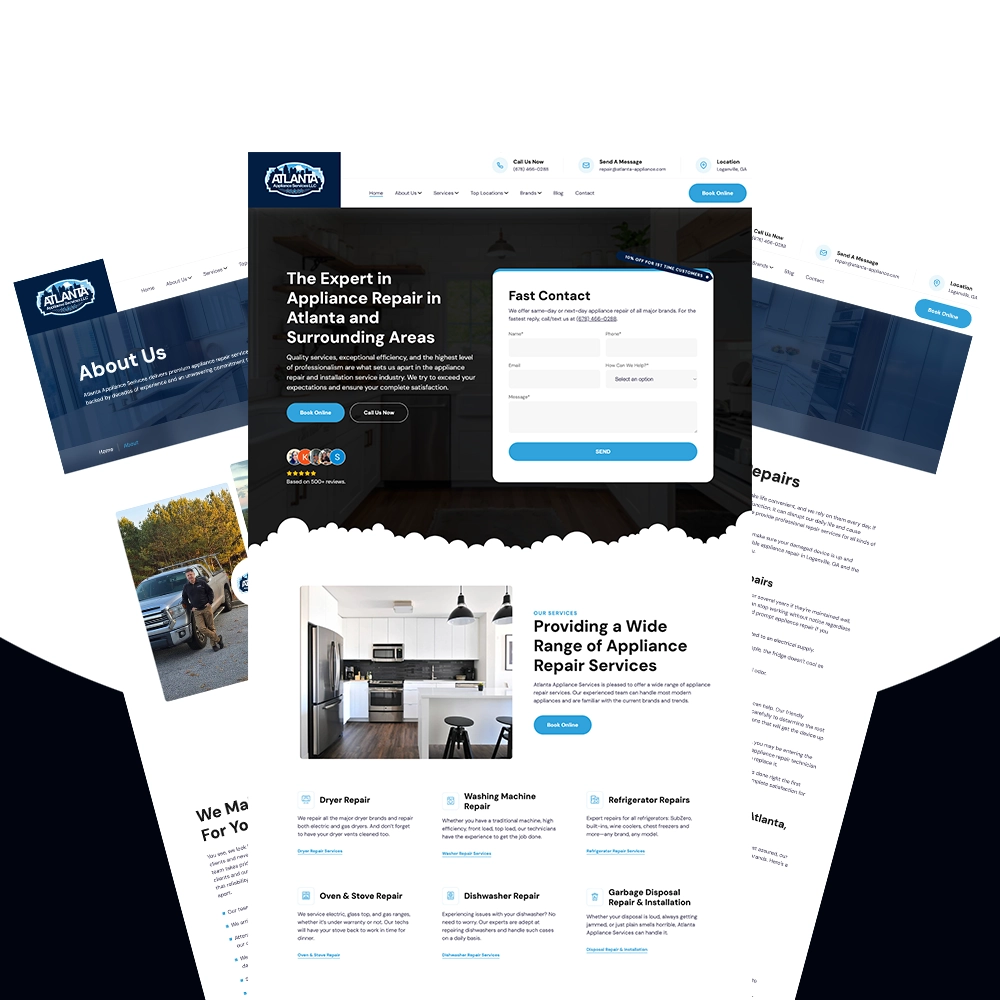
We learned this firsthand while rebuilding Atlanta Appliance Services. Their old WordPress site had roughly 110 pages, including 7 service pages, 22 location pages, and 81 blog posts. Some of those pages had earned strong positions in Google, so replacing everything at once would have put years of work at risk.
Our approach was simple: preserve what was working, fix clear problems, and delay larger SEO changes until the redesigned site had time to settle.
That does not mean a careful redesign is guaranteed to maintain every ranking. Search positions can fluctuate after any migration. But when you limit unnecessary changes, you reduce risk and make any movement much easier to diagnose.
Why SEO Has to Be Part of the Redesign From Day One
SEO is not a field you fill out before launch. It is built into decisions made throughout a website project:
- Which pages survive the redesign
- How URLs and directories are structured
- Where pages sit in the navigation
- Which pages link to one another
- Whether existing copy is retained or rewritten
- How headings, images, and structured data are implemented
- What happens when an old URL no longer exists
If the design is already approved before anyone reviews the existing website, important decisions have probably been made without enough information. A clean new navigation can accidentally bury a valuable page. A shorter sitemap can remove articles earning qualified traffic. A developer can improve a URL without realizing that other websites already link to the old one.
For an established business, the first step is not redesigning the homepage. It is understanding the site you already have.
The Atlanta Appliance Services Redesign
Atlanta Appliance Services came to us with an established WordPress website on the domain they still use today. We launched the custom-coded replacement around February 2025.
The original site contained:
- Approximately 110 total URLs
- 7 appliance repair service pages
- 22 local service-area pages
- 81 blog posts
- Standard company pages such as About, Contact, and Reviews
All 81 blog posts were retained. We also kept the same domain and preserved the complete body copy on the established pages at launch. We changed the code and presentation, but we did not use the redesign as an excuse to rewrite every page.
The site had no appliance brand pages at the time. We introduced those later, after the migration had settled and we could treat them as a separate SEO initiative.
Step 1: Build a Complete Inventory of the Old Website
We started with the XML sitemap, but we did not trust it as the only source of truth. A sitemap can be incomplete, outdated, or limited to pages the previous system chose to include.
We also crawled the site with Screaming Frog to see what a crawler could discover through its links. Then we checked those findings against Google Search Console, which helped us identify pages Google had seen and understand how they were performing.
For every page, we wanted to preserve at least:
- The full URL and slug
- H1
- Title tag
- Meta description
- Main body content
- Page type and location in the site structure
That inventory gave us a reliable list of what needed to be rebuilt. It also helped us spot overlapping pages and URLs that would need redirects.
How We Archived 100-Plus Pages Without WordPress
Copying that much content manually would have been slow and prone to mistakes, so we built a custom scraper with Node.js, JavaScript, and Puppeteer.
The scraper visited each URL and saved its important SEO elements and content into a Markdown file. We recreated the website as a directory of .md files that mirrored its URL structure. Instead of bringing over WordPress templates, plugin output, styling, and extra markup, we kept the information we actually needed in a clean, portable format.
That archive became our reference throughout development. We could rebuild each page with semantic HTML while checking its new version against the original H1, metadata, slug, and copy.
Our first version of that process had one important gap: it did not fully preserve the old site’s images and image alt text. We would later see why those assets deserved a place in the archive too.
Step 2: Find Out What Already Ranks Before Changing It
A page that already performs well should not be treated the same as a page Google barely shows.
We used Google Search Console to review page visibility, queries, and average positions. We used Moz for additional keyword research, including comparing current targets with possible long-term opportunities.
When a page already ranked for a relevant search, our default was to preserve its:
- URL when practical
- Primary topic and search intent
- H1
- Title tag
- Core copy
- Place in the site architecture
- Important internal links
We also kept existing meta descriptions when they remained accurate. Meta descriptions are not a direct Google ranking signal, and Google may rewrite them in search results. Still, retaining useful descriptions preserved the established messaging instead of introducing another change for no reason.
Underperforming Pages Give You More Freedom
When a page is not ranking, you have more room to reconsider its keyword, structure, and content. However, lack of rankings should not be the only reason to delete it.
Before changing an underperforming page, review whether it has:
- Search impressions even if its average position is weak
- Relevant backlinks
- Leads or assisted conversions
- Internal links that support other pages
- A necessary role in the customer journey
- Content that could be merged into a stronger page
If it has none of those things and better keyword research points in another direction, a redesign can be the right time to retarget or consolidate it. We simply avoided making those judgment calls across the entire Atlanta Appliance site at launch.
Step 3: Preserve the Structure Before Trying to Improve It
We kept as much of the original structure as we reasonably could. Pages were restyled and rebuilt with cleaner semantic markup, but their purpose and relationships stayed familiar.
This was partly about protecting existing signals and partly about measurement. A redesign already changes the platform, code, templates, and user experience. If you rewrite the content, alter the headings, move every page, and restructure all the internal links at the same time, you will have a hard time explaining why a ranking went up or down.
By limiting the initial changes, we established a more stable baseline. Once the new site had been crawled and indexed, we could make targeted improvements and evaluate them individually.
This is the principle we now use for established websites: migrate first, observe, and optimize second.
Step 4: Preserve Images and Alt Text Too
URLs and copy get most of the attention during a redesign, but images are part of the page too. Removing them can change the visible experience, surrounding context, and information available to image search.
Alt text also serves an important accessibility purpose: it communicates an image’s meaning when someone cannot see it. Good alt text should describe the actual image in context. If a relevant phrase naturally belongs in that description, it can help clarify the page topic, but alt text should never become a list of keywords.
A complete content archive should therefore capture:
- Original image URL and filename
- Alt text
- Caption, when present
- The page section where the image appeared
- Nearby text that explains its context
- Dimensions or aspect ratio when layout matters
What Happened on the Loganville Dryer Repair Page
We did not preserve every image during the first migration. On a page targeting dryer repair in Loganville, we later reintroduced a relevant image and wrote descriptive alt text that accurately matched the service and location shown.
After the image returned, the page moved back to approximately the number-two organic position for its target query.
That sequence made image preservation an obvious addition to our redesign process. It is useful anecdotal evidence, but it is not a controlled test. We cannot say the image or alt text was the only cause of the recovery. Recrawling, site-level changes, competitors, and other factors may have contributed.
What we can say is that the image was part of the formerly successful page, it had been omitted, and the page improved after we restored it. Today, we would preserve and evaluate that asset during the initial migration instead of waiting for a ranking change to expose the omission.
Step 5: Consolidate Pages Competing for the Same Search Intent
Preservation does not mean keeping every old page exactly as it is. The old Atlanta Appliance website had two overlapping service URLs:
https://atlanta-appliance.com/services/appliance-repair/https://atlanta-appliance.com/services/appliance-repairs/
Both addressed substantially the same service and intent. Search Console and our keyword research showed that the plural version had the better performance and opportunity, so we retained it as the primary page.
We permanently redirected /services/appliance-repair/ to /services/appliance-repairs/ rather than leaving both pages to compete.
This was not simply a decision between a singular and plural keyword. Before consolidating two pages, check:
- Whether searchers expect the same answer from both queries
- Which page has stronger rankings and impressions
- Which URL has useful backlinks
- Whether either page produces leads
- Which version provides the better long-term target
- Whether one combined page can satisfy the intent more clearly
When two pages do the same job, keeping both can split internal links, backlinks, and relevance between competing URLs. A deliberate consolidation gives the site one clear destination.
Step 6: Decide What to Keep, Improve, Combine, or Remove
Every URL should receive an intentional decision. We use four main categories:
| Decision | When it makes sense |
|---|---|
| Keep | The page ranks, converts, attracts relevant traffic, earns links, or supports a core service. |
| Improve later | The topic is valuable, but the page has weak content or unrealized search potential. |
| Combine and redirect | Multiple pages substantially overlap or compete for the same intent. |
| Remove | The page is obsolete, irrelevant, and has no useful replacement or measurable value. |
Do not redirect every removed URL to the homepage. If there is a close replacement, use a one-to-one permanent redirect. If no relevant replacement exists, an honest 404 or 410 can be more appropriate than sending visitors and crawlers somewhere unrelated.
Step 7: Map Every URL You Intentionally Change
Although we preserved most service and location URLs, we intentionally cleaned up the blog structure.
The old posts lived at root-level URLs such as:
/a-blog-name/
On the new site, we placed them under a clear blog directory:
/blog/a-blog-name/
All 81 articles were retained, but every one needed a one-to-one 301 redirect from its former URL. We also needed the redirect for the appliance repair page we consolidated.
For any redesign, build a redirect map before launch with these columns:
- Old URL
- New URL
- Page type
- Reason for the change
- Redirect status
- Tested final destination
Update internal links to point directly to the final URL instead of relying on the redirect. Then crawl the old URL list after launch to catch missing rules, chains, loops, and unexpected 404s. Google’s documentation similarly recommends permanent server-side redirects when URLs change and cautions against redirecting many old URLs to an irrelevant destination such as the homepage.
Step 8: Check Parent URLs, Even When Nobody Links to Them
One of our most useful lessons came from a page that was not visible in either site’s navigation.
The individual service-area pages lived inside the /service-areas/ directory, but we had not built a page at /service-areas/. Visiting that parent URL returned a 404. Because nobody could reach it through the old or new navigation, we missed it during the original rebuild.
We later saw rankings decline across the service-area pages. Once we built a proper service areas hub and had /service-areas/ indexed, those child-page rankings recovered.
The order of events was clear:
- The
/service-areas/parent returned a 404. - Rankings for service-area pages declined.
- We created and indexed the parent service areas page.
- The service-area page rankings improved afterward.
We believe restoring the hub clarified the section hierarchy and created a stronger internal-linking relationship for the service pages. But that is an inference, not proof that the missing parent was the only cause.
The practical lesson still holds: test parent paths and directories, even when they are not linked in the visible navigation. A crawler, sitemap, and manual URL review each reveal different gaps.
Step 9: Compare the Old Site With Staging Before Launch
A redesign should go through a side-by-side SEO review before the domain points to the new build. For every important URL, compare:
- Status code
- Final URL
- H1
- Title tag
- Meta description
- Main copy
- Images and alt text
- Canonical URL
- Indexability directives
- Internal links
- Structured data
- Sitemap inclusion
Also test every planned redirect and crawl staging for broken links and orphan pages. Make sure staging protections will be removed at launch. An accidental noindex directive or blocked robots rule can undo otherwise careful migration work.
Our own missed images and /service-areas/ page are exactly why this comparison should extend beyond visible copy. A page can look complete while still missing assets or structural relationships that existed before.
Step 10: Improve Performance Without Replacing Proven Content
We replaced Atlanta Appliance’s old WordPress implementation with a custom-coded website. This let us remove the plugin and page-builder overhead present in that specific build, optimize the assets, and control exactly what code loaded on each page.
The new site reached Lighthouse scores in the 90s and close to 100 across the measured categories. It loaded faster while preserving the established page topics and content.
That is not a claim that every WordPress site is slow. A well-built WordPress site can perform well, and a poorly built custom website can perform badly. In this case, the new implementation was materially lighter than the old one.
Performance was an improvement we could make without asking Google to reinterpret every page from scratch. The content remained familiar while the delivery became faster.
Step 11: Monitor the Migration Before Making Bigger SEO Changes
Launch is the beginning of the measurement period, not the end of the project.
We monitored priority positions and click-through rate in Search Console. We used Plausible Analytics to track visitors and conversion events, including:
- Phone calls
- Email clicks
- Form submissions
- Visits to the external booking system
The booking system was the most frequently used tracked call to action. Because Plausible measured visits to the booking system rather than confirmed completed appointments, those are best understood as booking-intent conversions.
Once the migration had time to settle, we began making measured additions and improvements. We introduced appliance brand pages, added a few new service cities, expanded some pages with locally relevant content, and added visible FAQs with appropriate structured data.
Separating those changes from the initial launch gave us a better chance of understanding their effect.
Results From the Atlanta Appliance Redesign
The priority rankings we monitored remained broadly stable after the redesign, and click-through rate did not materially change. That was important: the new website did not need to sacrifice established search positions to deliver a better experience.
Conversion performance improved over the following months. The conversion rate rose by roughly one to two percentage points per month during the first six months. Within four months, it increased from 5.5% to 13%, while monthly tracked leads rose from 28 to 48.
Those conversion figures included calls, email clicks, forms, and visits to the online booking system. They do not prove that the redesign alone caused every improvement. The site was also being monitored and improved over time, and a booking-system visit does not necessarily equal a completed appointment.
Still, the result reflects the outcome we wanted from the project: preserve established visibility while making the website faster and easier to use.
Website Redesign SEO Checklist
Before launching a redesign for an established website:
- Export the current XML sitemap.
- Crawl the website independently.
- Export Search Console page and query benchmarks.
- Archive every URL, H1, title tag, meta description, and body copy.
- Preserve image files, placement, captions, and alt text.
- Identify pages targeting the same search intent.
- Classify every page as keep, improve, combine, or remove.
- Preserve successful URLs and core content where practical.
- Create a redirect map for every changed URL.
- Update internal links to their final destinations.
- Check parent directories and unlinked URLs.
- Compare the staging site with the live site page by page.
- Test redirects, canonicals, robots rules, and indexability.
- Validate structured data against the visible page content.
- Generate and submit the updated sitemap.
- Monitor rankings, crawl errors, and conversions after launch.
- Make larger SEO changes incrementally.
Preserve First, Then Improve
The biggest website redesign SEO mistake is assuming a new design requires a completely new content strategy. If a page already ranks for the right topic and helps the business, preserve it unless you have evidence that a change is worth the risk.
That means carrying over more than copy. Preserve the URL, intent, headings, internal links, images, and alt text that make the page whole. Consolidate genuine overlap, redirect changed URLs carefully, and verify the architecture beyond what appears in the navigation.
Once the redesigned site is live and stable, start improving it one decision at a time. You will have cleaner data, clearer explanations for ranking changes, and a much better chance of building on the site’s existing foundation instead of starting over.
Planning a redesign for an established business? Learn how we approach custom web design for small businesses and small-business SEO services, or contact Flat6 Solutions to talk through your existing site.